Choose a benchmark
Select a GPU row to prefill the current lowest on-demand cloud rate, or enter your own rate.
Ownership versus cloud planning tool
Estimate a GPU server's total cost of ownership from hardware, power, cooling, facility, support, operations, and resale assumptions. Then compare the result with a cloud GPU rental benchmark for the same useful workload.
Cloud benchmark rows were last refreshed from Sep 10, 2026. Rates are planning inputs, not vendor quotes.
Use the calculator first
Enter the complete purchase budget and the operating pattern you expect. The GPU Server Cost Calculator estimates ownership TCO, useful GPU-hour cost, cloud rental cost, and a simple break-even month. Change the assumptions to stress-test the decision; the result is not a quote.
Planning result
Submit the form to compare total cost, effective GPU-hour cost, and the estimated break-even month.
The recommendation will appear after calculation.
| Power and cooling | — |
|---|---|
| Facility and operations | — |
| Support and maintenance | — |
| Resale credit | — |
The calculator runs in your browser. Inputs are not sent to the server by the tool itself; the selected cloud benchmark is rendered from the current provider dataset.
What the model is comparing
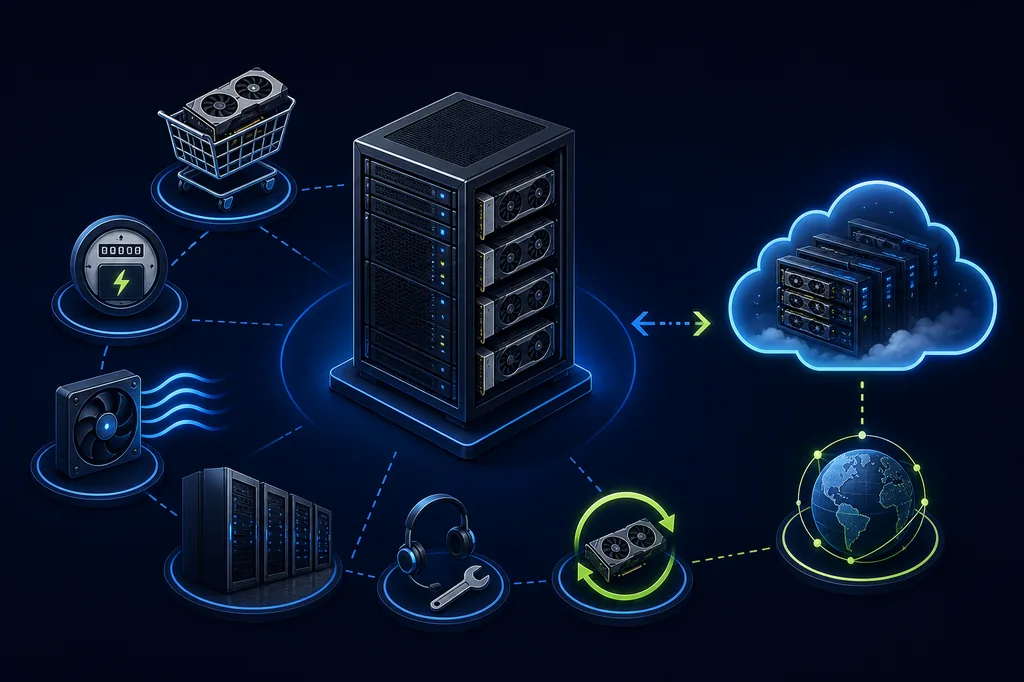
A purchase looks cheap when the comparison includes only the GPU card. A useful model also accounts for the host system, deployment, electricity, cooling overhead, rack or facility fees, support, operations, and the value you may recover when the hardware is retired.
Cloud rental is not automatically cheaper. It avoids upfront CapEx and facility work, but hourly rates, recurring storage, network charges, idle time, and utilization determine the total. The calculator keeps these assumptions visible so you can change them instead of hiding them in a single “buy” or “rent” label.
How to use it
Select a GPU row to prefill the current lowest on-demand cloud rate, or enter your own rate.
Include the accelerators, host, memory, storage, chassis, delivery, deployment, and any network CapEx.
Set useful hours per day and utilization. Do not assume that a powered-on server produces useful work every hour.
Change electricity, PUE, support, utilization, and planning period to see whether the recommendation survives less favorable assumptions.
Input guide
| Input | Use this for | Why it matters |
|---|---|---|
| Complete hardware cost | Server and GPU purchase | Separates the upfront system budget from recurring costs. |
| Average server draw | Measured or expected kW | Power cost should reflect the whole server, not only GPU TDP. |
| PUE / cooling factor | Facility overhead | Captures cooling and power-delivery overhead outside the server. |
| Useful utilization | Productive work percentage | Controls how many paid cloud hours are comparable to owned capacity. |
| Support / resale | Annual maintenance and exit value | Prevents ownership from looking artificially expensive or cheap. |
| Cloud rate and fees | Rental benchmark | Includes the GPU-hour price plus recurring storage or network charges. |
Example scenarios
Use a shorter planning period, lower utilization, and the live cloud benchmark. This usually highlights the value of avoiding a large upfront purchase.
Use the expected useful hours, measured power draw, facility cost, support rate, and a conservative resale value. Compare three years instead of a single month.
Paste a vendor's complete hardware quote into CapEx, then test electricity and PUE with your facility assumptions. Use $3.75/GPU-hour only as a starting benchmark.
Decision guide
That result is meaningful only if utilization is realistic, the hardware remains useful for the full planning period, and your team can support power, cooling, maintenance, and downtime.
Check whether the result is driven by low utilization, high facility cost, or a high cloud rate. A different provider, spot capacity, or longer usage window can change the comparison.
If monthly cloud cost does not exceed the recurring ownership cost, the calculator reports no break-even. That often means demand is too bursty or the cloud rate is too low for a purchase to recover its CapEx.
The break-even number is a simple planning estimate. It does not model financing, taxes, depreciation schedules, procurement delays, GPU failures, capacity shortages, or a changing cloud rate.
Accuracy and limits
Hardware pricing, power draw, support, electricity, taxes, financing, and cloud availability vary by region and time. Replace the defaults with a vendor quote or measured facility data before approving spend.
A cheaper GPU-hour is not automatically equivalent. Compare memory capacity, model fit, throughput, latency, software support, storage, network, and time-to-result along with cost.
The GPU selector uses the current provider rows available to GPU Cost. A minimum observed rate can be capacity-limited or exclude storage, network, taxes, and platform fees.
Calculator inputs stay in the browser during normal use. Do not enter confidential vendor quotes or credentials into any public page.
Continue the analysis
FAQ
The model includes hardware, deployment and network CapEx, electricity, PUE or cooling overhead, rack and facility charges, operations, support and maintenance, and resale credit. It compares that result with cloud GPU hours plus recurring cloud fees.
There is no universal answer. A purchase can win at sustained high utilization, while cloud rental can win for experiments, bursty workloads, changing GPU requirements, or teams without infrastructure operations.
No. GPU TDP is only one component. Use measured average system draw when possible, or include the host CPU, memory, storage, power supplies, and cooling overhead in your estimate.
It means the modeled monthly cloud cost does not exceed recurring ownership cost, so the upfront purchase does not recover itself under the current usage pattern. Test higher utilization or a different cloud rate rather than forcing a break-even date.
Yes. Increase GPU count and enter the complete eight-GPU system quote, measured power, interconnect or network CapEx, and realistic utilization. Dense systems often need separate facility and cooling assumptions.